PWA - No App Store Required
FairCrown runs as a Progressive Web App. Install it directly from your browser in under 10 seconds with no app store approval delays or storage requirements.
App at FairCrown in Australia: Mobile Version Explained
Install the FairCrown PWA in under 10 seconds on any iOS or Android device. Full 5,000+ game catalogue, AUD cashier with PayID, and live dealer tables from your home screen.
Your Casino in Your Pocket
Install the FairCrown PWA in under 10 seconds on any iOS or Android device. Full 5,000+ game catalogue, AUD cashier with PayID, and live dealer tables from your home screen.
Add to Home Screen 18+ only. Gambling can lead to addiction, and bonus terms apply to every offer.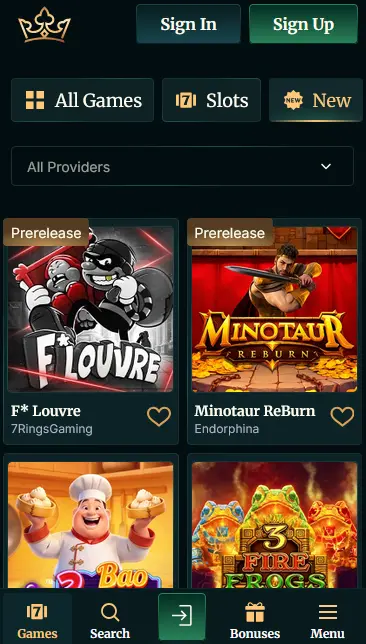
How to Install FairCrown on Your Device
FairCrown App: Strengths and Trade-Offs
Pros
Cons
What Makes the FairCrown Mobile Experience Different
PWA - No App Store Required
FairCrown runs as a Progressive Web App. Install it directly from your browser in under 10 seconds with no app store approval delays or storage requirements.
Instant Game Loading
HTML5 games from Pragmatic Play, Hacksaw Gaming, and Evolution Gaming load directly in the browser with no additional plugins, even on older hardware.
Full Security Stack on Mobile
128-bit SSL encryption, optional 2FA, and Tobique Gaming Commission licence No. 0000002 apply identically across desktop and mobile sessions.
Staying Safe on Mobile
What You Should Do
What You Should Avoid
Device Requirements
Android
iOS
FairCrown delivers its mobile experience as a Progressive Web App (PWA), which means installation happens directly from your browser rather than through the Google Play Store or Apple App Store. Neither store lists FairCrown for real-money gambling under Australia’s Interactive Gambling Act 2001.
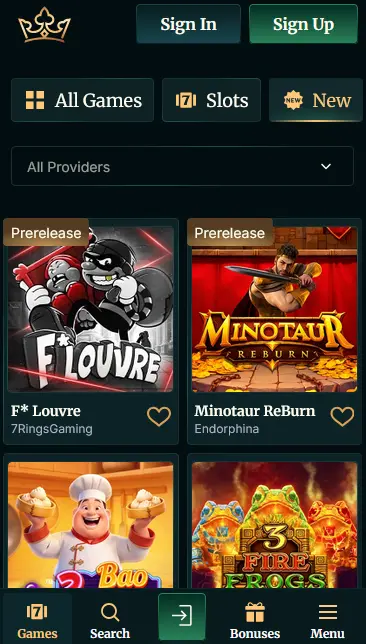
Open faircrownaussie.com in Chrome on your Android device (Android 8.0 or later). When the browser detects the PWA, a prompt may appear at the bottom of the screen inviting you to install. If it does not appear automatically, tap the three-dot menu in the top-right corner and select “Add to Home Screen” or “Install App.” Confirm the prompt, and the FairCrown icon will appear on your home screen. An Android APK is also available for direct download from the FairCrown website for players who prefer that route; the website provides instructions for enabling installation from unknown sources if required.
Open faircrownaussie.com in Safari on your iPhone or iPad (iOS 14 or later; Chrome on iOS does not support PWA installation). Tap the Share icon at the bottom centre of the Safari toolbar. Scroll down the share sheet and tap “Add to Home Screen.” Optionally rename the shortcut, then tap “Add” in the top-right corner. The FairCrown icon will appear on your home screen immediately.
If you prefer not to install the shortcut, the full game catalogue, cashier, and live casino are available any time you navigate directly to faircrownaussie.com in a mobile browser. The PWA simply adds the convenience of a dedicated home-screen icon that opens in full-screen mode without browser chrome.
Both account creation and daily sign-in work identically on mobile and desktop, with no separate mobile-only credentials.
Tap the registration button on the FairCrown homepage in your mobile browser. Fill in your email address, choose a password, and enter your full legal name, date of birth, mobile number, and residential address. Select AUD as your account currency. Confirm you are 18 or older and agree to the terms. Tap “Create Account,” then verify your email address from the confirmation message. The account activates immediately after email verification.
Enter your registered email and password on the login screen. If two-factor authentication is enabled on your account, you will be prompted for the one-time code after the password step. Players who have saved credentials to their device’s password manager or biometric authentication can sign in with a single tap. See the FairCrown login guide for troubleshooting and security settings.
Every bonus available on the desktop site is fully accessible from the mobile browser and PWA, with no mobile-specific restrictions on claiming or wagering.
The five-tier welcome package (up to $10,000 in match funds plus 500 free spins) can be activated and played entirely from a mobile session. Deposits via PayID or Mastercard on mobile credit instantly, and free spins on Big Bass Splash, Fortune of Olympus (Pragmatic Play), and Aztec Magic Bonanza (BGaming) run in the mobile browser without any quality reduction. The x40 wagering requirement applies identically. 18+ only.
Promo codes FS30, FS50, FS100, MEGAFS, and LUCKY3 are all redeemable from the mobile cashier by entering the code in the promo field before confirming a deposit. The Wednesday cashback (10% of net slot losses, capped at $5,000) credits automatically each week to eligible mobile accounts. Full bonus details are on the FairCrown bonus page. 18+ only.
FairCrown’s HTML5 platform runs across all modern smartphones and tablets without additional plugins or downloads.
Android 8.0 (released 2017) is the minimum supported version. The site performs best on Chrome, though other Chromium-based browsers are compatible. Players running older hardware may notice load times on the most graphics-intensive Hacksaw Gaming and Nolimit City pokies; mid-range 2019 or newer devices handle the full catalogue without issue.
iOS 14 or later is required. Safari is the recommended browser for iOS and is the only browser on iPhone and iPad that supports PWA home-screen installation. The casino loads in landscape and portrait modes equally well on iPhone SE (second generation) and newer, as well as all iPad models released from 2018 onwards.
| Platform | OS Version | Browser | Storage |
|---|---|---|---|
| Android | 8.0 or later | Chrome (recommended) | No additional storage for PWA |
| iOS | 14 or later | Safari (required for install) | No additional storage for PWA |
| Android APK | 8.0 or later | Not required | Approx. 10-20 MB for APK |
The full FairCrown game catalogue is available in the mobile browser with no titles excluded from the mobile experience.
Thousands of pokies load directly in the mobile browser via HTML5. High-volatility titles from Hacksaw Gaming, Nolimit City, and Play’n GO play smoothly on mid-range devices. Megaways mechanics, bonus-buy features, and progressive jackpot triggers all function identically to the desktop version. The Dog House Megaways (Pragmatic Play) and Big Bass Splash (Pragmatic Play) are two of the most played titles in the mobile lobby.
Evolution Gaming live tables including Crazy Time and Monopoly Live, plus Ezugi and Pragmatic Play Live content, stream in HD on mobile. Live Blackjack, Roulette, and Baccarat are available 24 hours a day. The live lobby adapts to portrait or landscape orientation, with controls sized for thumb navigation on screens from 5.4 inches upward. Large-screen phones and tablets benefit from additional camera angles on some Evolution Gaming tables.
All RNG table game variants, including multi-hand Blackjack, European Roulette, Casino Hold’em, and Baccarat, are available on mobile with the same betting limits as desktop. Video poker machines from multiple providers are also accessible without any format change.
Progressive jackpot pokies from Pragmatic Play and BGaming display live prize pool totals in the mobile lobby. Jackpot wins can be triggered from a mobile session in the same way as on desktop, with payouts processed through the standard cashier flow.
The FairCrown mobile cashier supports the full range of payment methods without any mobile-specific restrictions on limits or processing times.
PayID and POLi are available for direct Australian bank transfers from the mobile cashier, with deposits settling instantly. Visa and Mastercard are accepted from most Australian banks. MiFinity, Skrill, and Neteller provide e-wallet options. Cryptocurrency deposits via CoinsPaid (BTC, ETH, LTC, SOL, USDT, USDC) are accessible from the mobile cashier with the same limits as desktop.
| Method | Deposit | Withdrawal |
|---|---|---|
| PayID / POLi | Instant | 1-5 business days |
| Visa / Mastercard | Instant | 1-5 business days |
| Skrill / Neteller / MiFinity | Instant | Within 24 hrs (post-approval) |
| Cryptocurrency (CoinsPaid) | Instant | Within 24 hrs (post-approval) |
All withdrawals enter a pending window of up to 48 hours before processing begins. KYC identity verification (Australian passport, driver’s licence, or proof of address) must be completed before the first withdrawal clears.
All payment transactions on mobile are protected by the same 128-bit SSL encryption used on the desktop platform. The mobile cashier does not store full card numbers. Two-factor authentication, if enabled, applies to cashier sessions as an additional layer of authorisation.
The FairCrown mobile experience matches the desktop platform in game coverage, cashier features, and account management tools, with a few differences in presentation format.
The mobile lobby loads the full 5,000+ game catalogue sorted into the same categories as desktop: pokies, live casino, table games, jackpots, and game shows. A search function finds any title by name or provider. Bonus claiming, promo code entry, deposit limit setting, and self-exclusion tools are all accessible from the account menu. The PWA supports home-screen installation with a dedicated icon that opens in full-screen mode without browser address bar.
Live game show titles (Crazy Time, Monopoly Live) display in a slightly simplified camera layout on small screens. The sports betting section is fully accessible from mobile, including live in-play markets and quick bet slips on AFL and NRL matches. Game lobby filters and sort options are condensed into a collapsible panel to preserve screen space on portrait-orientation phones.
Security on the FairCrown mobile platform is governed by the same stack as the desktop site.
All connections to faircrownaussie.com use 128-bit SSL and PGP encryption regardless of device. This covers login credentials, game session data, and every cashier transaction. The Tobique Gaming Commission E-gaming licence No. 0000002 requires ongoing third-party audits of both the platform and the certified RNG systems in place across the game catalogue.
Two-factor authentication is available to all players from the account security settings panel. Once activated, a one-time code is required at every login regardless of whether the session is initiated from desktop, mobile browser, or the PWA shortcut. This prevents unauthorised access even if a password is obtained by a third party.
The FairCrown PWA installed on iOS or Android inherits the device’s biometric unlock capability. If your device uses Face ID, Touch ID, or a fingerprint reader, saved credentials in your device’s password manager can be retrieved via biometric authentication, allowing fast and secure login without typing a password.
FairCrown’s support infrastructure is fully accessible from the mobile browser and PWA.
Live chat is available directly from the mobile lobby without leaving a game session. The chat icon is accessible from the main menu at all hours. Email support for document submissions, KYC queries, and account escalations is available at [email protected].
Deposit limits, loss limits, wager limits, cooling-off periods, and self-exclusion options are all accessible from the mobile account settings panel. These tools are available at any time without contacting support. Setting a deposit limit before the first session is recommended and can be completed during registration from a mobile device.
App Questions from Australian Players
No, FairCrown is not listed in either store; instead it runs as a PWA that installs directly from the browser in under 10 seconds, giving the same full-screen experience without an app store download.
Yes, the full 5,000+ game catalogue and AUD cashier are available directly through any mobile browser; the home-screen shortcut is optional and simply adds convenience.
FairCrown requires iOS 14 or later; install via Safari using the Share icon and 'Add to Home Screen' option for the best full-screen experience.
Yes, all bonuses including the Tuesday free spins on Big Bass Splash 1000 and the welcome package free spins can be activated and played entirely from the mobile browser or PWA.
Install FairCrown and Start Playing
Take up to $10,000 and 500 free spins across your first five deposits.
Enter the Casino 18+ only. Gambling can lead to addiction, and bonus terms apply to every offer.